![RRA_Logo_For_email.png]](https://knowledge.rudolphresearch.com/hs-fs/hubfs/RRA_Logo_For_email.png?height=50&name=RRA_Logo_For_email.png)
AutoFlex – Troubleshooting Air Bubbles During Sample Loading
Applies To: AutoFlex R837 / R827 / R817
Loading Modes: Vacuum Loading and Gas Displacement Loading
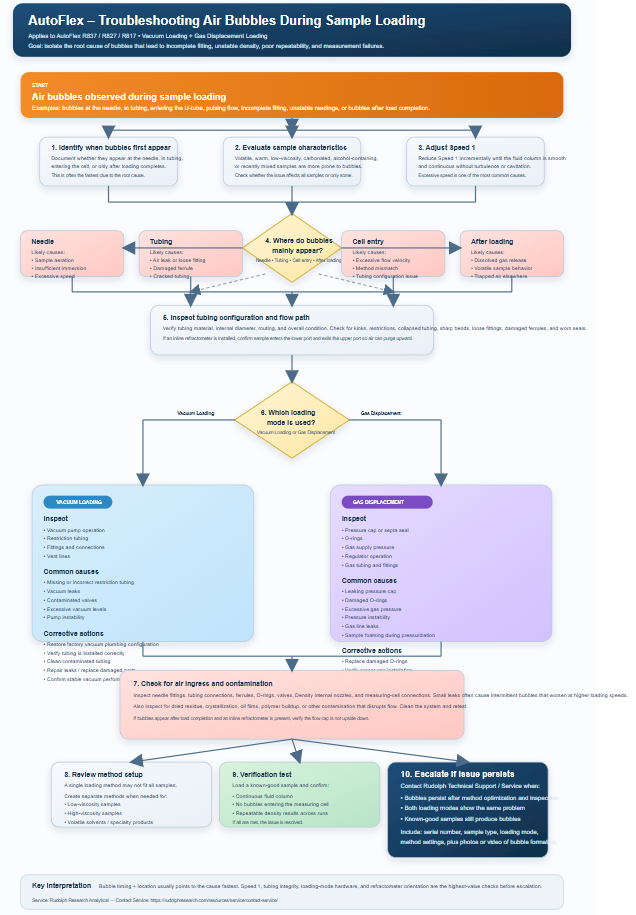
PurposeThis article provides a systematic troubleshooting procedure for air bubbles observed during sample loading on AutoFlex instruments. Air bubbles can cause incomplete filling of the measuring cell, unstable density results, poor repeatability, measurement failures, and extended loading times. The location and timing of bubble formation often indicate the underlying cause.
SymptomsVisible bubbles in sample tubing, bubbles at the needle, bubbles entering the U-tube, pulsing or inconsistent flow, incomplete filling, unstable measurement readings, bubbles appearing after load completion, or issues occurring only with specific sample types or loading modes.
Diagnostic Workflow1. Identify when bubbles first appear.
2. Determine which loading mode is being used.
3. Evaluate sample properties.
4. Adjust Speed 1.
5. Observe bubble location.
6. Inspect tubing and flow path.
7. Verify loading-mode-specific components.
8. Check for air ingress (leaks).
9. Inspect for contamination.
10. Review method setup.
11. Verify performance using a known-good sample.
Document where bubbles first appear: at the needle, in the tubing, entering the measuring cell, or after loading completes. This observation is often the fastest way to isolate the root cause.
Step 2 – Evaluate Sample CharacteristicsVolatile solvents, alcohol-containing products, warm samples, carbonated products, recently mixed samples, and low-viscosity fluids are more prone to bubble formation. Determine whether the issue occurs with all samples or only specific sample types.
Step 3 – Adjust Speed 1Speed 1 is one of the most common causes of bubble generation. Excessive loading speed can create turbulence, cavitation, degassing, or draw air through marginal seals. Reduce Speed 1 incrementally until a smooth, continuous fluid column is observed.
Step 4 – Interpret Bubble LocationNeedle: sample aeration, insufficient immersion, or excessive speed.
Tubing: air leak, loose fitting, damaged ferrule, or cracked tubing.
Cell entry: excessive flow velocity, method mismatch, or tubing configuration issue.
After loading: dissolved gas release, volatile sample behavior, or trapped air elsewhere in the system.
Verify tubing material, internal diameter, routing, and overall condition. Inspect for kinks, restrictions, collapsed tubing, sharp bends, loose fittings, damaged ferrules, and worn seals.
Vacuum Loading TroubleshootingIn Vacuum Loading mode, sample is drawn into the system using negative pressure generated by the vacuum pump.
Inspect:
• Vacuum pump operation
• Restriction tubing
• Fitting and connections
• Vent lines
Common Causes:
• Missing or incorrect restriction tubing
• Vacuum leaks
• Contaminated valves
• Excessive vacuum levels
• Pump instability
Corrective Actions:
• Restore factory vacuum plumbing configuration
• Verify tubing is installed correctly
• Clean contaminated tubing
• Repair leaks and replace damaged components
• Verify stable vacuum performance during loading
Gas Displacement Loading Troubleshooting
In Gas Displacement mode, the sample is loaded by pressurizing a capped sample tube or test tube. Pressure buildup above the liquid forces the sample through the tubing and into the measuring system.
Inspect:
• Pressure cap or septa seal
• O-rings
• Gas supply pressure
• Regulator operation
• Gas tubing and fittings
Common Causes:
• Leaking pressure cap
• Damaged O-rings
• Excessive gas pressure
• Pressure instability
• Gas line leaks
• Sample foaming during pressurization
Corrective Actions:
• Replace damaged o-rings
• Verify proper cap installation
• Reduce pressure if foaming occurs
If the AutoFlex system includes an inline refractometer, incorrect flow-cell orientation can introduce air into the system.
Correct Configuration:
• Sample must enter the LOWER port.
• Sample must exit the UPPER port.
Reason:
This orientation allows air to naturally purge upward and out of the flow cell during filling.
Incorrect Configuration:
If the flow cap is installed upside down, air can become trapped inside the refractometer and later be released into the flow path. This may produce bubbles after loading, unstable density results, and unstable refractive index measurements.
Corrective Action:
Verify the flow cap orientation and ensure sample enters from the bottom and exits from the top.
Step 8 – Check for Air Ingress
Inspect needle fittings, tubing connections, ferrules, O-rings, valves, Density internal nozzles and measuring-cell connections. Small leaks often create intermittent bubbles that worsen at higher loading speeds.
Step 9 – Check for ContaminationInspect for dried sample residue, crystallization, oil films, polymer buildup, or contamination that may disrupt flow. Perform cleaning procedures and verify operation using a known-good sample.
Step 10 – Review Method SetupSometimes you may need to create separate methods for low-viscosity samples, high-viscosity samples, volatile solvents, and specialty products. A single loading method may not be suitable for all sample types.
Verification TestLoad a known-good sample. Confirm a continuous fluid column, absence of bubbles entering the measuring cell, and repeatable density results across multiple measurements.
Escalation CriteriaEscalate to Rudolph Technical Support / Contact Service if bubbles persist after method optimization and hardware inspection, if both loading modes exhibit the same issue, or if known-good samples continue to produce bubbles. Include instrument serial number, sample type, loading mode, method settings, and photos or videos showing bubble formation.
Contact Service - Rudolph Research Analytical