![RRA_Logo_For_email.png]](https://knowledge.rudolphresearch.com/hs-fs/hubfs/RRA_Logo_For_email.png?height=50&name=RRA_Logo_For_email.png)
Overview
How to respond to an Air Zero error, an abnormal Air Zero result, or an unstable zero calibration on a refractometer performing Air Zero / reference calibration.
Applies To: Refractometers performing Air Zero or reference calibration.
Before You Begin
Before starting the Air Zero procedure, confirm the following:
- The instrument is powered on and has completed its full warm-up period.
- The prism is clean, dry, and free of any sample residue.
- You are logged in with the appropriate calibration or setup access level.
Air Zero Procedure
1. Clean the Prism Thoroughly
- Remove all sample residue from the prism.
- Verify that the prism is completely dry before proceeding.
2. Navigate to Air Zero
Go to: Setup → Calibration / Instrument Settings → Air Zero
3. Perform Air Zero
- Start the Air Zero procedure.
- Allow the process to complete without interruption.
If Air Zero Completes Normally
- Select Done.
- Proceed with calibration or normal operation.
If You See “Air Zero Too Large”
- Accept the result.
- Immediately perform Air Zero again.
- If the error does not repeat on the second attempt, continue operation.
Recommended Validation After Air Zero
After completing Air Zero, validate performance before returning the instrument to routine use.
Perform a Two-Point Calibration
Use appropriate standards, such as:
- Water
- Calibration fluid
Validate with Water
- Clean the prism.
- Measure water.
- Record the result.
- Clean the prism again.
- Re-measure water.
- Record the second result.
Validate with Calibration Fluid
- Clean the prism.
- Measure the calibration fluid.
- Record the result.
- Clean the prism again.
- Re-measure the calibration fluid.
- Record the second result.
Consistent results indicate a successful Air Zero.
If Problems Persist
If Air Zero remains unstable or errors continue:
- Re-clean the prism and repeat Air Zero.
- Confirm there is no airflow, draft, or condensation near the prism.
- Power-cycle the instrument and retry the procedure.
If the issue remains unresolved, contact technical support and provide:
- The exact message shown on the instrument
- Whether the error repeated on the second Air Zero attempt
- Any recent maintenance or calibration activity
Troubleshooting Flow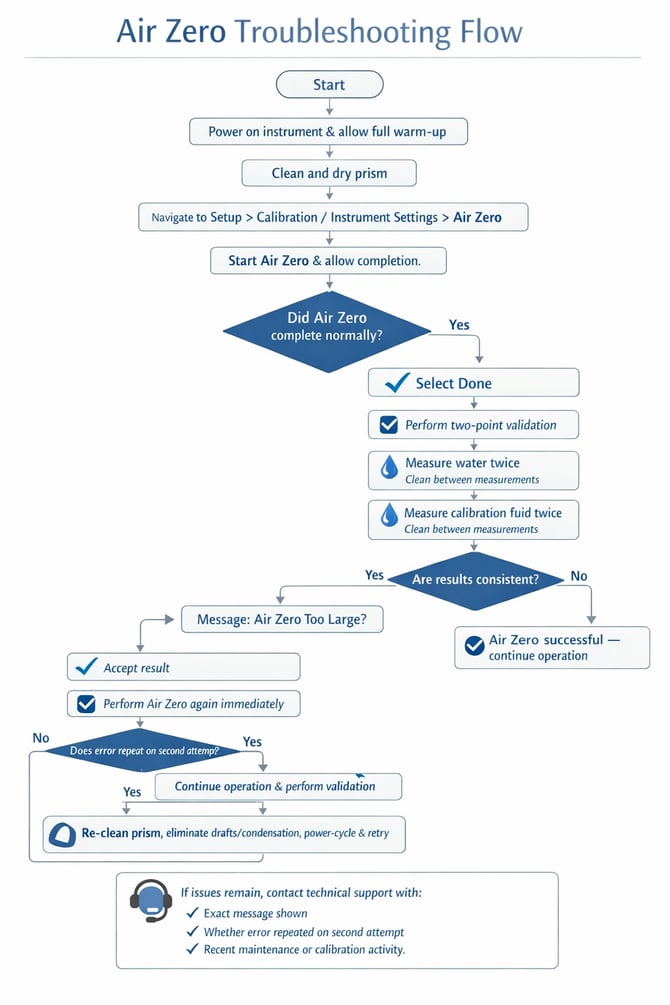
Need Additional Help?
Give us a call, we are happy to help! (973) 584-1558 Monday - Friday 8:30AM - 5PM EST or open a service ticket. Request a quote for a field service visit or replacement part.