![RRA_Logo_For_email.png]](https://knowledge.rudolphresearch.com/hs-fs/hubfs/RRA_Logo_For_email.png?height=50&name=RRA_Logo_For_email.png)
The measurement stops before completing all readings.
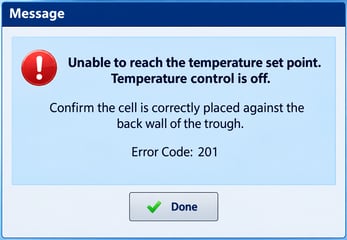
During a measurement, the instrument begins the analysis normally but stops before completing the programmed number of readings. For example, a method configured for five readings may stop after the fourth reading and display a message indicating that the measurement was terminated.
When this occurs, a final measurement result may not be generated.
Cause
This behavior does not necessarily indicate a software or firmware malfunction.
The instrument firmware includes a temperature-control safety mechanism. If the instrument is unable to reach or maintain the specified temperature within the required time interval, the firmware may automatically shut off temperature control.
This condition can occur when:
- The temperature probe is not properly inserted into the sample cell.
- The sample cell is not positioned correctly in the temperature-control trough.
- The instrument cannot reach the required temperature within the allowable time.
If a measurement is already in progress when the user interface receives notification that temperature control has been shut off, the instrument will display a message and terminate the measurement.
What Happens to the Measurement Data?When a measurement is terminated because of this condition, the measurement information should still be recorded by the system.
Verify the following:
- Check the PDF Export Location
A PDF report should be created immediately when the measurement is terminated. Confirm that the PDF is available in the configured export location. - Check the 21 CFR Part 11 Data Screen
Confirm that the measurement appears in the 21 CFR Part 11 Data screen. - Check the Audit Trail
Review the audit trail and confirm that a Measurement Terminated entry appears after the measurement was started.
Before repeating the measurement:
- Confirm that the temperature probe is fully and correctly inserted into the sample cell.
- Confirm that the sample cell is properly positioned in the temperature-control trough.
- Verify that the temperature-control system is operating normally.
- Allow the sample and temperature-control system sufficient time to stabilize at the required temperature.
- Restart the measurement and confirm that all programmed readings are completed.
A measurement terminated by the temperature-control safety mechanism is an intentional protective function of the instrument rather than, by itself, evidence of a software or firmware failure.
If the condition occurs repeatedly after confirming correct probe and cell placement, additional troubleshooting of the temperature-control system may be required.
How can we further assist you?
Give us a call, we are happy to help! (973) 584-1558 Monday - Friday 8:30AM - 5PM EST or open a service ticket. Request a quote for a field service visit or replacement part.