![RRA_Logo_For_email.png]](https://knowledge.rudolphresearch.com/hs-fs/hubfs/RRA_Logo_For_email.png?height=50&name=RRA_Logo_For_email.png)
Overview
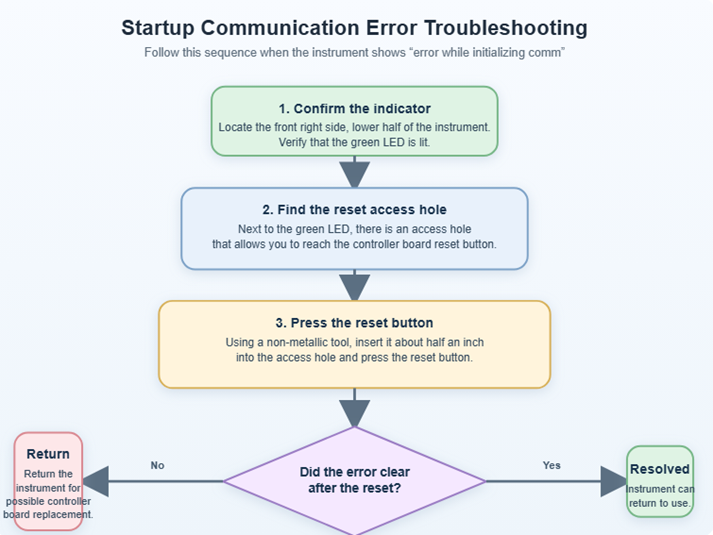
If the instrument displays “error while initializing comm” during startup, the issue may be related to the controller board communication. This guide walks through a simple reset procedure that can be performed safely in the field.
Before you begin
- Use a non-metallic tool to perform the reset.
- Insert the tool only about half an inch into the access hole.
- Do not force the tool.
Troubleshooting flow
Step-by-step instructions
1) Locate the LED and access hole
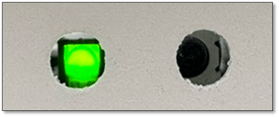
On the front right side, lower half of the instrument, there should be a green LED. Next to that LED is an access hole that provides access to the controller board reset button.
2) Reset the controller board
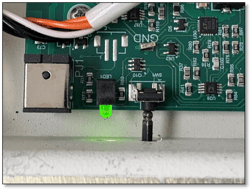
Using a non-metallic tool, carefully insert the tool into the access hole to a depth of approximately half an inch. Press the reset button.
3) Check whether the error is resolved
After pressing the reset button, restart or observe the instrument and determine whether the communication error has cleared.
- If the error clears: the instrument may be returned to normal use.
- If the error persists: the instrument will need to be returned for possible controller board replacement.
Important note
If the error remains after performing the reset procedure, additional field troubleshooting is not recommended based on the current guidance. The next step is service evaluation and possible controller board replacement. You will need an RMA for a factory repair of the instrument. Please confirm if you have the original shipping set consisting of the box and custom designed foam to prevent instrument damage during shipping.